Guide
Chrome new tab extension: how to pick the right one
A good Chrome new tab extension turns a blank page into a page you use. Pick one that helps you start the next action faster, whether that means a calmer screen, quicker shortcuts, or built-in focus tools.
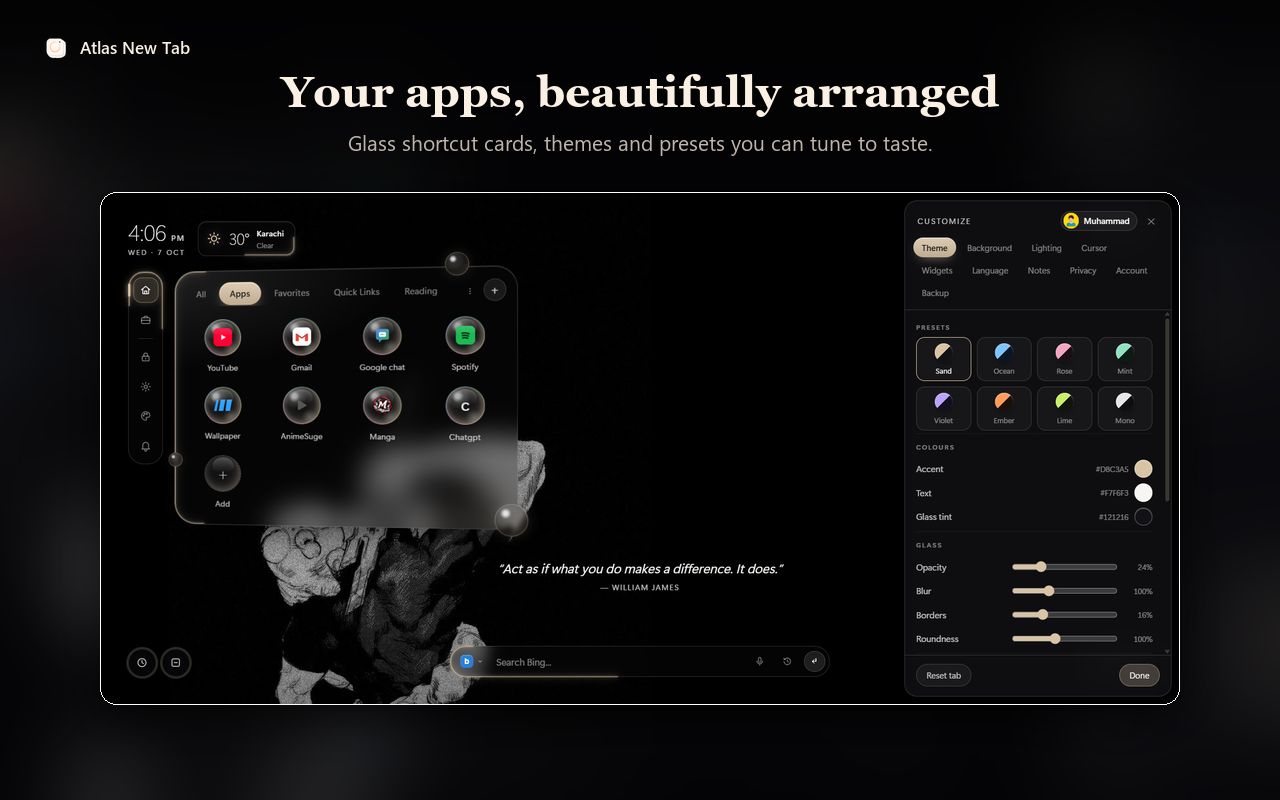
The best choice depends on what you want when a tab opens. Some people want a clean visual reset, some want tasks and reminders in view, and some want both without feeling crowded. The page should feel light, stay out of the way, and still earn its place every time it appears. If it helps in a small, repeatable way, you will notice. If it looks nice but slows you down, it is the wrong fit.
What to look for in a Chrome new tab extension
- Check that the page solves a real first-tab need for you, such as seeing your top sites, starting a timer, reviewing tasks, or getting a cleaner visual start than the default page.
- Make sure the useful parts are visible right away. If you have to open menus before you can do anything, the extension will fade into the background and stop helping.
- Open a few new tabs in normal use and watch how the page feels. It should appear cleanly, respond without lag, and avoid heavy motion or clutter unless you chose those on purpose.
- Look for layout control, not just theme control. A good setup lets you decide what stays on the page, what stays hidden, and where key items sit.
- Check whether settings stay put. If you move cards, change a background, or hide a widget, those choices should save themselves without extra work.
- Review permissions, privacy details, and the extension's update habits. If the purpose is unclear, the permissions feel broad, or the page tries to do too much, keep looking.
- Compare a few best Chrome new tab extensions side by side before installing one, so you judge them on the same basics instead of on screenshots alone.
Choose features that match how you start your day
Start with the first thing you want from a new tab. If the page is there to make the browser feel calmer, focus on backgrounds, spacing, readable text, and shortcuts that stay tucked away until needed. A guide to wallpaper extension options helps if the visual side matters most, but the page should still be usable after the first impression fades.
If you open a tab to plan, choose tools that reduce switching. Useful signs include quick notes, a small task list, pinned sites, search, and reminders that appear without taking over the screen. That works best when the page helps you start, not when it becomes another dashboard to maintain.
If you want focus, pick tools that reduce distractions
Focus features matter when the problem is not starting, but staying on task. Look for a timer, a simple blocker, or a way to hide tempting shortcuts during work sessions. These tools are most helpful when they live close to the page you already open, so you do not need another app to get into work mode.
If you want both mood and structure, choose carefully. The best mixed setups keep the visual layer quiet and the practical tools close at hand. A beautiful page helps only when it does not bury the next useful action.
How Atlas combines a new tab page with daily tools
A new tab page can be more useful when it combines atmosphere with tools you actually use before the workday settles in. Atlas provides a free new tab extension for Chrome with live 4K wallpapers, a command center, a focus timer, reminders, habits, a site blocker and translation. That is a practical example of a broader approach: the page does not have to choose between looking calm and helping you act.
This kind of setup works best when the visual side supports the practical side. A background can make the browser feel less harsh, while nearby reminders, shortcuts, and timers reduce the need to open extra tabs before you begin. The gain is not just style. It is fewer small decisions at the moment when attention is still forming.
It also changes what "productivity" means on a start page. Instead of adding more panels, the better approach is to keep common actions within reach and keep the rest hidden until needed. If that is the model you want, look for a new tab finally worth opening: a page that feels calm first and useful the moment you need it.
A quick way to compare extensions before you install one
| What to compare | Good sign | Warning sign | Best fit |
|---|---|---|---|
| Background and design | Clean look, readable text, motion you can tame or turn down | Busy visuals, hard-to-read text, effects that fight for attention | Visual-first browsing or a calmer start |
| First action on the page | Shortcuts, notes, tasks, or search are obvious and easy | Useful tools are buried in menus or side panels | People who want to act as soon as a tab opens |
| Layout control | You can hide, move, and simplify the page | Fixed layout with widgets you cannot remove | Mixed needs that change through the day |
| Speed and feel | Opens quickly, stays smooth, does not feel heavy | Noticeable delay, stutter, or clutter after a few uses | Anyone who opens many tabs |
| Trust and upkeep | Clear purpose, sensible permissions, settings that stay saved | Vague purpose, broad permissions, settings that keep resetting | Long-term daily use |
This table shows the fastest way to compare extensions: judge each one by what appears first, how easy it is to trim, and whether it stays light enough to live in your browser every day.
Why a better new tab page can become a better routine
Choose the extension that fixes the first bad moment of your day. If you want calm, pick a visual-first page; if you want action, pick a task-first page; if you want both, choose a blended setup only when you will use both parts often.
That rule works because a new tab page is a repeated moment, not a one-time feature. Small friction adds up when the page appears all day, and small help adds up too. The best choice is usually the one that removes a tiny delay, reduces tab hopping, or gives you a clearer next step without adding maintenance.
A combined setup makes sense when you want the page to set a tone and prompt action in the same place. For readers who want live wallpapers for Chrome's new tab and practical tools together, Atlas is a concrete example of a start page that does more than decorate the browser.
Use a page like that if your tabs usually open into indecision. Keep it simple if your routine already works. Atlas is most useful when the new tab page becomes a place to start, not a place to drift.
Frequently asked questions
Can a Chrome new tab extension replace the default new tab page?
Yes, a new tab extension can replace the default new tab page. Once installed and enabled, it opens its own page whenever you create a new tab, so the main thing to check is whether that page helps you more than the simple default one.
What should I check before installing a custom new tab extension?
Check what the page does, what permissions it asks for, and whether you can hide what you will not use. It also helps to test how quickly it opens and whether its settings stay saved after you change the layout or background.
Do new tab extensions slow Chrome down?
Yes, some do, but the better ones stay light enough that you barely notice them. Heavy animation, crowded widgets, and too many background features are the usual causes, so test the page in normal use before you keep it.
Is a new tab page better for productivity or for design?
It can be either, but it works best when design supports productivity instead of replacing it. A calm background can help the page feel better to open, yet the lasting value usually comes from shortcuts, reminders, or focus tools you actually use.